
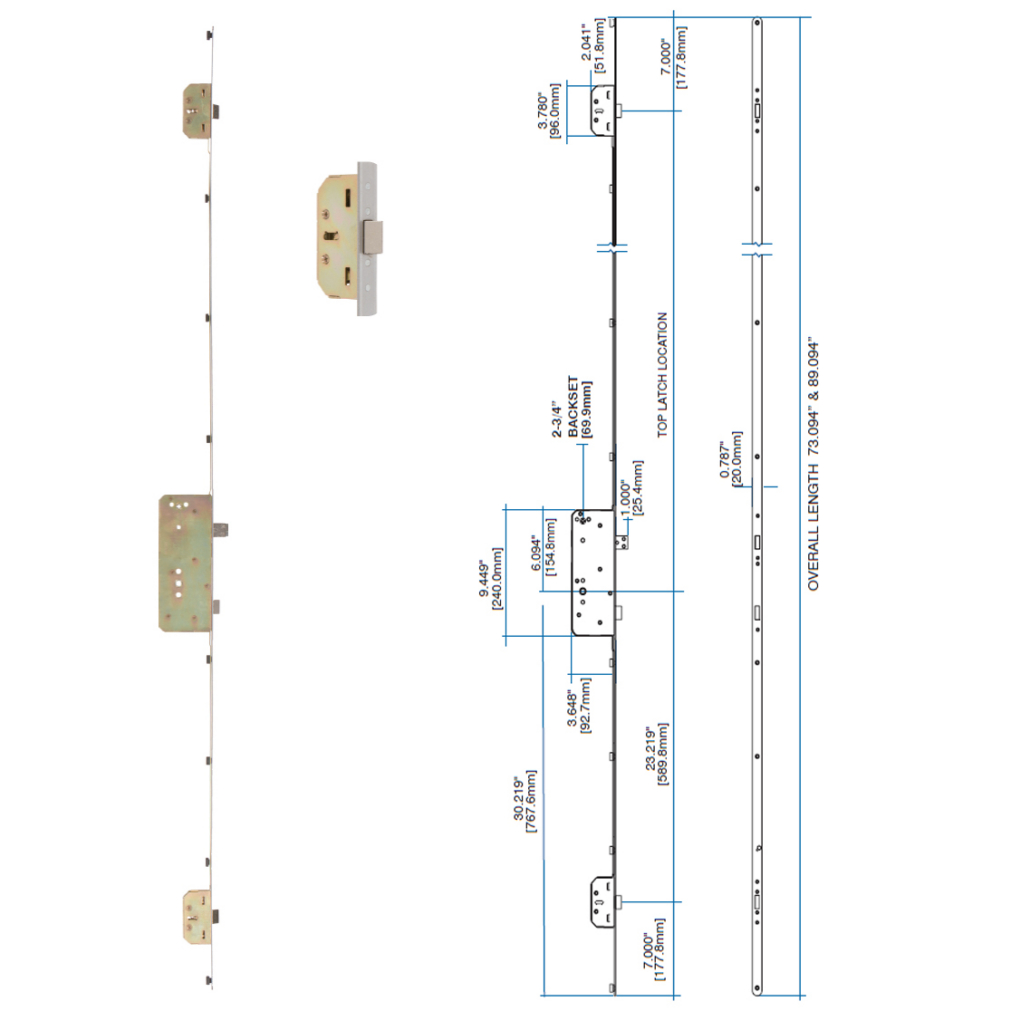
How Do I Know If I Have a Rockwell Entry Door Multipoint Lock?
Most customers we talk to already know they have a multipoint lock — they just don’t know which one. But if you’re not sure whether your lock is a multipoint at all, here’s the quickest way to check.
Open your front door and look at the metal strip running along the edge of the door — the part that faces the door frame when the door is closed. On a standard single-point deadbolt, you’ll see one latch and one bolt. On a multipoint lock, you’ll see three locking points: one in the center (the main deadbolt), and one near the top and one near the bottom of that metal strip.
Still not sure? Close the door and turn your deadbolt. If you feel the door being pulled tight against the frame at multiple points — not just in the middle — you almost certainly have a multipoint lock.
The good news is, if it’s a Rockwell and it’s on a standard entry door (not a patio or garden door), you’re in exactly the right place. Let’s narrow it down.
Does My Lock Have Latches or Tongues at the Top and Bottom?
This is the single most important question for identifying your lock, and it’s one a lot of people get tripped up on. The top and bottom locking points on your Rockwell multipoint lock will be one of two types — latches or tongues — and they look noticeably different.
Here’s the part most people miss: you need to look at the top and bottom points specifically, not the center deadbolt. The center is the same across all models. It’s what’s happening at the top and bottom that tells us which lock you have.
Latches
A latch has a spring-loaded, angled tip — the same style as a standard door latch. When you close the door, it clicks into place automatically. If you push the top or bottom latch with your finger, it springs back. This is the Rockwell XL Series.
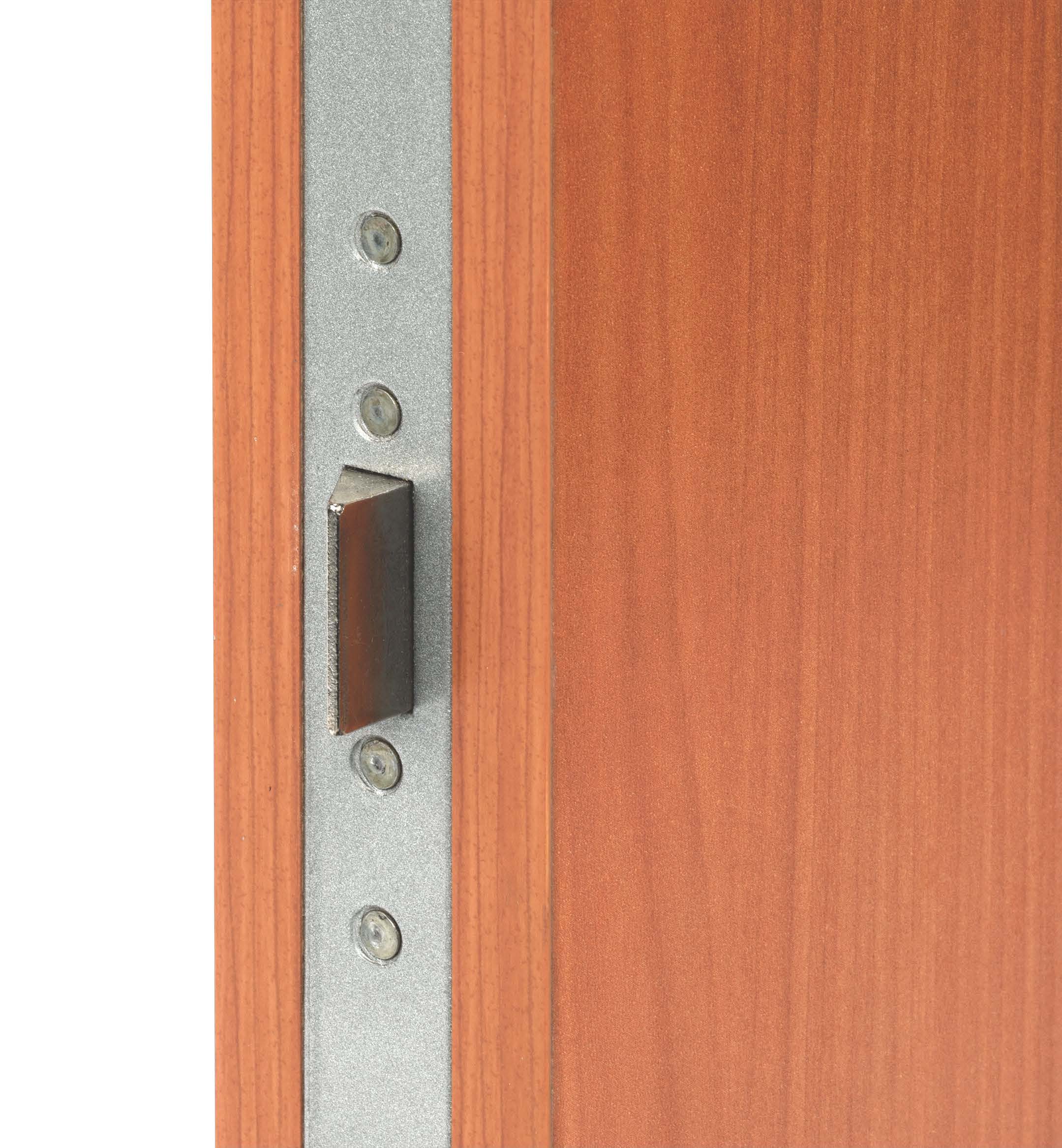
Latches top and bottom — this is the Rockwell XL Series multipoint lock.
Tongues
A tongue (sometimes called a hook or deadlocking tongue) is a fixed, rectangular projection — it doesn’t spring back when you push it. It only moves when you operate the deadbolt. If your top and bottom points look flat and rigid rather than angled and springy, you’ve got the Rockwell ST Series.
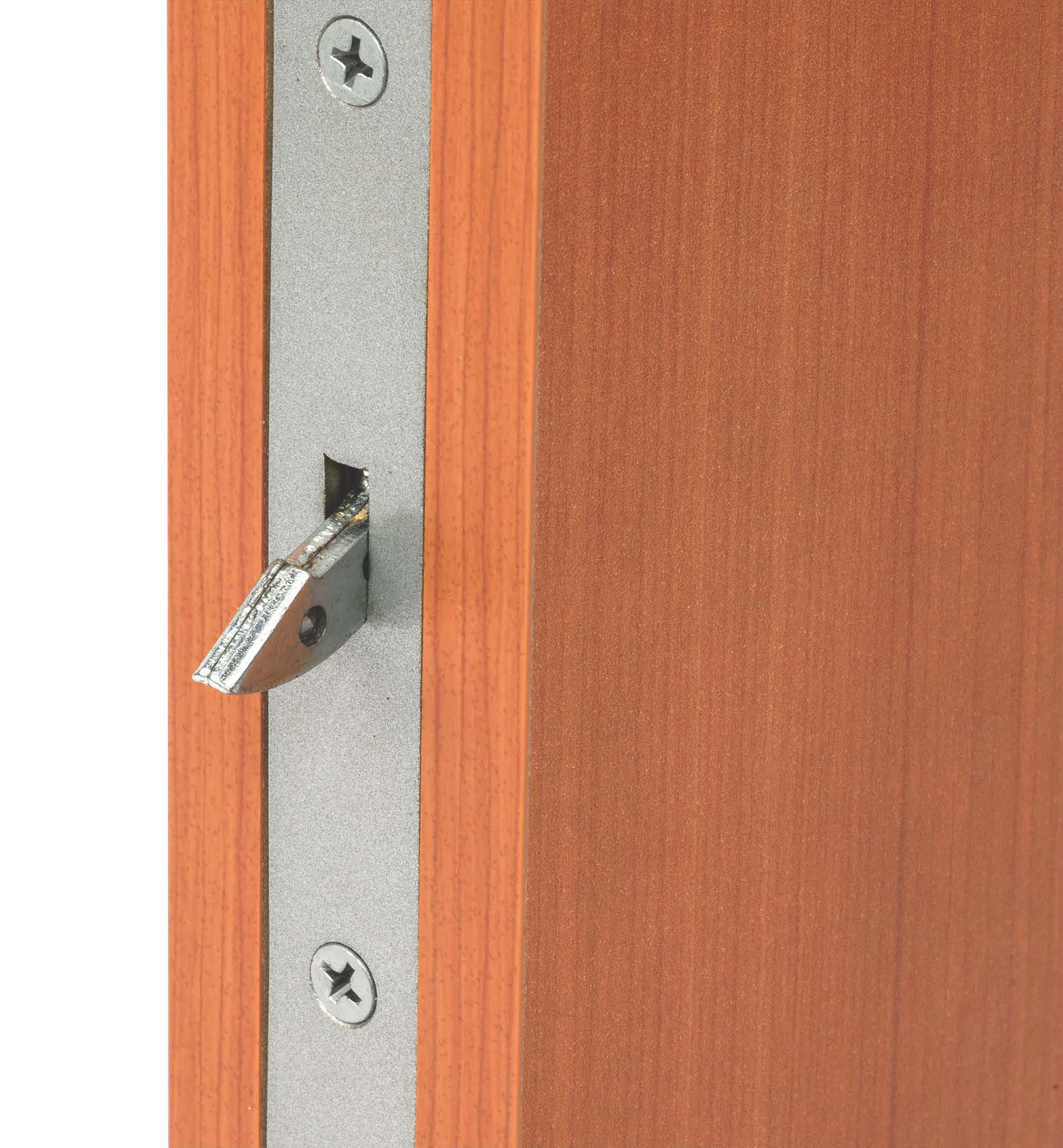
Tongues top and bottom — this is the Rockwell ST Series multipoint lock.
We see this mix-up all the time, and it matters — XL and ST series parts are not interchangeable. Take a good look before moving on.
Why Accurate Identification Matters
We know it might feel like extra steps, but getting the identification right at the start saves a lot of frustration later. Rockwell multipoint locks are precision-engineered systems — the lock body, the strike plates, and the handle set all need to match. Ordering a replacement strike plate for the XL Series when you actually have the ST Series means it won’t line up, and the door won’t close properly.
It also affects warranty coverage. Rockwell multipoint locks must be used with compatible Rockwell handle sets — mixing brands or substituting parts voids the warranty. So if something has gone wrong with your lock, knowing exactly which model you have helps us figure out quickly whether this is a covered issue or something we need to troubleshoot differently.
The few minutes you spend on this guide can save a lot of back-and-forth. Browse our full multipoint lock collection here if you’d like to see the range while you work through the questions.
Is My Door a Right-Hand or Left-Hand Door?
Door handing is one of those things that sounds more complicated than it is. Here’s the quickest way to figure it out.
Stand outside your home, facing the door as if you’re about to walk in. Look at which side the hinges are on:
- Hinges on the left side = Left-hand door (LH)
- Hinges on the right side = Right-hand door (RH)
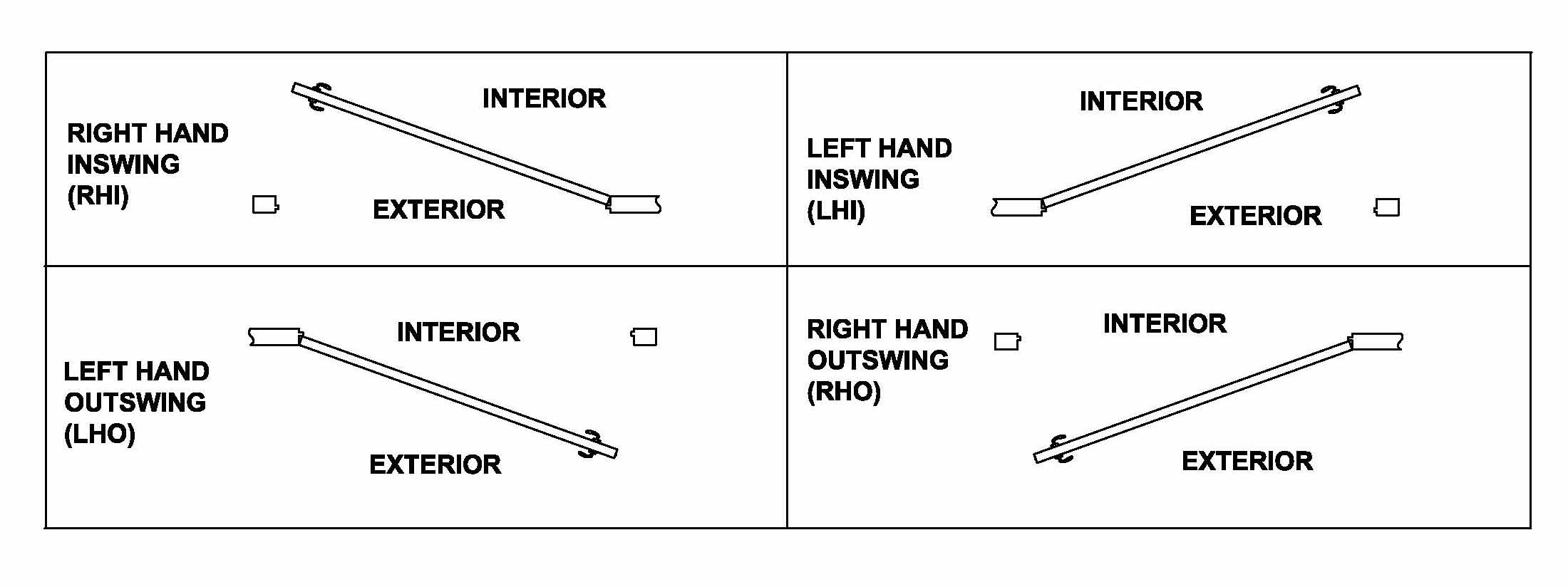
Left-hand vs. right-hand door — always determine handing from the outside, facing the door.
Most Rockwell multipoint lock bodies are field reversible with a screwdriver, so handing is more relevant for the handle set and strike plates than for the lock body itself. But it’s still an important detail for our team to have when helping you find the right parts.
What Is the Total Length of the Metal Strip (Faceplate) on the Edge of the Door?
This is the measurement that definitively confirms which lock body you have. The metal strip running along the edge of your door — the faceplate — is a different length for each Rockwell multipoint lock model.
You’ll need a tape measure for this one. Open the door wide enough to see the full faceplate clearly, and measure from the very top to the very bottom of the metal strip. Don’t measure the door — measure the metal strip itself.
Match your measurement to the table below:
| Total Length | Door Height | Lock Series | View Product |
|---|---|---|---|
| 66.59″ | 6’8″ door | XL Series (latches) or ST Series (tongues) | XL Series 66.59″ ST Series 66.59″ |
| 79.72″ | 8’0″ door | XL Series (latches) or ST Series (tongues) | XL Series 79.72″ ST Series 79.72″ |
| 73″ | 6’8″ door | RS Series (latches, 2‑3/4″ backset) | RS Series 73″ |
| 89″ | 8’0″ door | RS Series (latches, 2‑3/4″ backset) | RS Series 89″ |
A note on the 66.59″ and 79.72″ lengths: Both the XL and the ST series share the same faceplate length. That’s why the latch vs. tongue question in the previous step matters so much — length alone won’t separate them. If your faceplate is 66.59″ and you have latches at the top and bottom, you’ve got the XL. Same length with tongues? That’s the ST.
The RS Series (73″ or 89″) is easy to distinguish because it’s the only Rockwell entry door multipoint with a 2‑3/4″ backset rather than 2‑3/8″.
Which Handle Set Do I Have on the Door?
Once you’ve identified the lock body, the next piece of the puzzle is the handle set. This matters because Rockwell multipoint locks are designed to work exclusively with Rockwell handle sets — using a non-Rockwell handle or modifying your handle set will void the warranty. So if you need a replacement handle, we need to know which one you have.
Look at your handle set and compare it to the options below. We’ve shown the brushed nickel / classic wave lever version of each for clarity — your handle may be in a different finish or with a different lever style, but the overall shape and escutcheon plate (the backplate behind the handle) is what you’re matching.
Handle A — Sapphire Deadbolt Trim Set
A deadbolt-only trim set with no lever handle. Simple, clean escutcheon plate with a thumb turn inside and key cylinder outside.
View Sapphire Deadbolt Trim Set →
Other finishes and lever styles are available — browse the full collection here.
Handle B — Sapphire Classic Wave Lever Trim Set
A slender, contemporary trim set with the classic wave lever. Narrower escutcheon plate, clean lines, no grip handle.
View Sapphire Classic Wave Lever Trim Set →
Other finishes and lever styles are available — browse the full collection here.
Handle C — Monaco Handleset with Classic Wave Lever
A traditional grip handleset with a curved exterior grab handle and an interior lever. The Monaco has a classic, elegant profile with a full-length escutcheon plate.
Other finishes and lever styles are available — browse the full collection here.
Handle D — Verano Handleset with Classic Wave Lever
A lever-on-lever handleset — no grip bar, just levers on both the interior and exterior sides. The Verano has an 11″ x 2‑1/2″ escutcheon plate. Compatible with XL, ST, and RS series locks.
Other finishes and lever styles are available — browse the full collection here.
Handle E — Times Square Handleset with Delta Lever
A lever-on-lever handleset with the distinctive Delta lever — a more angular, contemporary look compared to the Classic Wave. Compatible with XL, ST, and RS series locks.
Other finishes and lever styles are available — browse the full collection here.
Handle F — Winslow Handleset with Classic Wave Lever
A grip handleset with a straight, contemporary exterior grab handle rather than a curved one. Clean, modern proportions. Compatible with the ST Series (7322) only.
Other finishes and lever styles are available — browse the full collection here.
Handle G — Savoy Handleset with Classic Wave Lever
A traditional grip handleset with a gracefully curved exterior bar and solid brass construction. Compatible with the ST Series (7322) only.
Other finishes and lever styles are available — browse the full collection here.
Handle H — San Jose Handleset with Quattro Lever
A grip handleset featuring the Quattro lever — a square-shouldered, contemporary lever design. Solid brass construction. Compatible with the ST Series (7322) only.
Other finishes and lever styles are available — browse the full collection here.
Handle I — Carmel Handleset
A substantial grip handleset with a bold, curved exterior bar and full solid brass construction. The Carmel has a distinctive, architectural presence. Compatible with the ST Series (7322) only.
Other finishes and lever styles are available — browse the full collection here.
Handle J — Lumina Handleset with Delta Lever
A premium grip handleset with solid brass construction and the Delta lever on the interior. The exterior bar has an elegant, flowing profile. Compatible with the ST Series (7322) only.
Other finishes and lever styles are available — browse the full collection here.
Handle K — Zenia Handleset with Delta Lever
A contemporary solid brass grip handleset with the Delta lever and a distinctly modern exterior grip profile. Compatible with the ST Series (7322) only.
Other finishes and lever styles are available — browse the full collection here.
Handle L — Aqua Lever Trim Set with Delano Deadbolt
A two-piece sectional multipoint trim set combining the Aqua Chelsea lever handleset with the Delano multipoint deadbolt. Solid brass construction. The Aqua lever has a clean, contemporary profile and the Delano deadbolt sits separately on the escutcheon plate above the lever — giving a distinctive two-component appearance that is different from all the grip handlesets above. Compatible with XL, ST, and RS series locks .
View Delano Multipoint Deadbolt →
Other finishes and lever styles are available — browse the full collection here.
Where Was the Lockset Purchased?
This one might seem like a strange question, but it actually helps us a lot. Knowing where your lockset came from tells us whether it was purchased as a standalone product, came pre-installed by a door manufacturer, or was supplied through a distributor.
A few things to check or think about:
- Did it come already in the door? If so, do you know the door manufacturer’s name? Many door manufacturers pre-install Rockwell locks, and they sometimes have specific configurations we can cross-reference.
- Do you have a receipt or proof of purchase? Even a rough date of purchase is helpful — it can narrow down which production run your lock came from, which matters if a specific batch had a known issue.
- Was it purchased from a hardware store, a door dealer, or online? Each channel has slightly different part number configurations, and knowing the source helps us verify.
If you can’t remember any of this, don’t worry — just skip to the next question. The physical measurements and handle identification will usually get us there.
What Issue Are You Having with Your Multipoint Lock?
Now we get to the reason you’re here. The more specific you can be, the faster we can help. Vague descriptions like “it’s not working” leave our team with a lot of ground to cover. Try to answer as many of these as you can:
- Is the problem with the deadbolt, the latch, or one of the top/bottom locking points specifically?
- Does the issue happen when locking, when unlocking, or both?
- Is the door misaligned — does it stick, or does it not close flush against the frame?
- Has anything changed recently — a new door, a renovation, a seasonal shift in the weather?
- Is the lock body the issue, or is it the handle set (the trim that you actually grab)?
- Is there visible damage, and if so, where?
Photos are genuinely the fastest path to a solution. If you can send us clear photos of the full faceplate, the top and bottom locking points, and the handle set — both inside and outside — our team can usually identify the lock and the issue without any back-and-forth. Pictures of the problem area specifically are even better.
Ready to Get This Sorted? Here’s What to Do Next.
You’ve done the hard part. If you’ve worked through the questions above, you now know your lock series, your door handing, your faceplate length, and your handle set. That’s everything our team needs to point you to the right part, confirm warranty coverage, or help you troubleshoot the issue.
There are two easy ways to reach us:
- Fill out our multipoint lock identification questionnaire below — answer each question and attach photos directly. Hit Submit and we will get back to you within one business day.
- Email us at info@rockwellsecurityinc.com with your answers to the questions above and any photos you can take. We’ll get back to you with a clear recommendation.
We’ve been doing this for over 30 years, and there’s not much we haven’t seen. Whatever the issue is with your Rockwell multipoint lock, we’ll help you get it right. Browse our full multipoint lock range here while you wait to hear back from us.